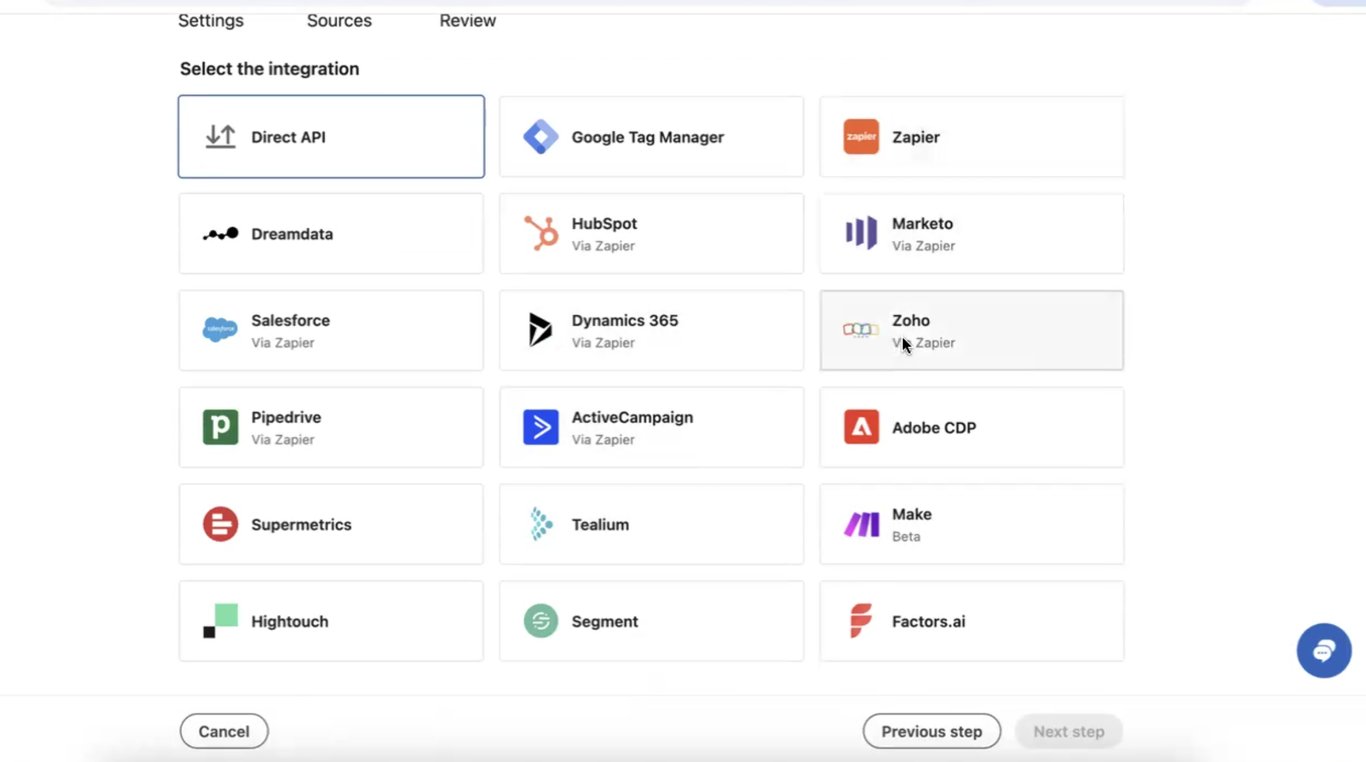
When setting up LinkedIn's Conversion API with a Zapier integration, marketers often encounter an unexpected quirk in the configuration process. While LinkedIn offers several integration options, including specific "via Zapier" choices for various CRMs like Zoho, HubSpot, and Salesforce, these options can sometimes lead to connection issues and error messages.
The Solution: Choose Standalone Zapier
The more reliable approach is to select the standalone "Zapier" option when configuring your conversion tracker in LinkedIn, rather than any CRM-specific "via Zapier" options. This holds true even if you are indeed using your CRM through Zapier.
Configuration Steps:
Create a new conversion tracker in LinkedIn
In the integration selection screen, choose "Zapier" (not your CRM "via Zapier")
Complete your Zapier automation setup as normal
Test the connection
How You Know It's Working
A successful setup will show as "Active" in your LinkedIn conversion settings rather than remaining in an "Unverified" state. The data flow remains the same (CRM → Zapier → LinkedIn), but this configuration ensures LinkedIn properly validates the incoming conversion data.
This small but crucial detail can make the difference between a reliable conversion tracking setup and one that generates frequent error messages.
Need support setting this up? We can help!
Struggling with LinkedIn Conversion API integration through Zapier and your CRM? Let us guide you in setting up a seamless solution using LinkedIn, Zapier, and your preferred apps like HubSpot or Salesforce. Book a free consultation today!
Build an automated crawler that finds broken links and missing images, logs each issue to Notion, and routes fixes to an owner, so you skip the manual audits.